Authentication
BESSE supports two ways to sign in, both converging on the same identity: the user's wallet address is their user ID across the app, the database, and the blockchain.
| Path | Who it's for | How it works |
|---|---|---|
| Social sign-in (Privy) | Mainstream users — municipal staff, facility operators | Google or email login; a secure embedded wallet is created automatically behind the scenes |
| Wallet sign-in (MetaMask) | Crypto-native users | One-click login by cryptographically signing a server-issued challenge |
Social Sign-In with Embedded Wallets (primary path)
BESSE originally launched with wallet-only authentication (described below). In practice, requiring mainstream users — municipal staff, recycling facility operators — to install a wallet extension and safeguard a seed phrase proved to be the single biggest onboarding barrier.
The current primary path uses Privy (opens in a new tab):
- The user signs in with Google or an email code — no extension, no seed phrase.
- Privy automatically provisions an embedded Ethereum wallet for the account. The user gets a real, self-custodial wallet without needing to know what a wallet is (keys remain exportable at any time).
- The client calls the
signInWithSocial_V2cloud function, which mints a Firebase custom token whose UID is the wallet address — so both sign-in paths produce the same identity. - New accounts receive a small amount of test ETH so they can immediately approve and bid on-chain.
This keeps the original goal intact — every user owns a wallet and their assets — while removing the friction that kept non-crypto users out.
Wallet Sign-In (signature challenge)
The basic idea is that it's cryptographically easy to prove the ownership of an account by signing a piece of data using a private key. If you manage to sign a precise piece of data generated by our back end, then the back end will consider you the owner of that public address. Therefore, we can build a message-signing-based authentication mechanism with a user's public address as their identifier.
Benefits of the wallet approach:
- No cumbersome form-filling.
- No need to remember yet another username/password pair.
- The whole process takes seconds instead of minutes.
Login workflow
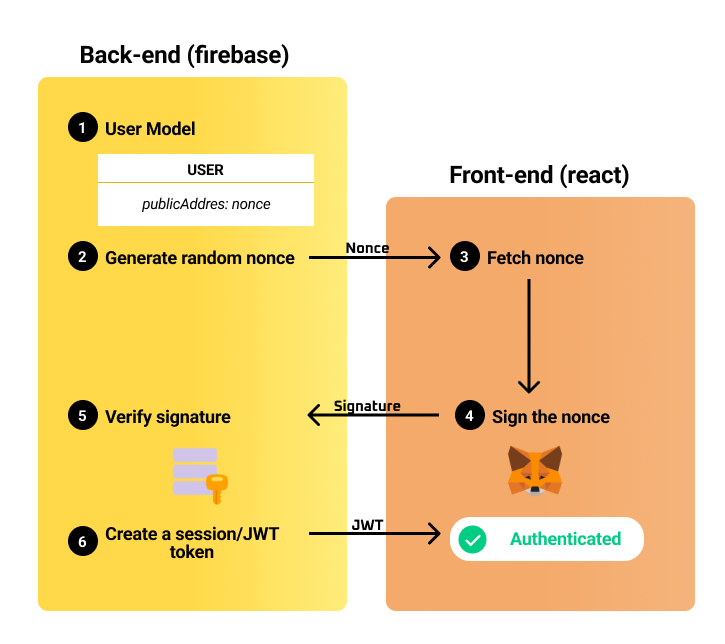
Step 1: Click on connect wallet (front-end)
The user will first click on connect wallet, which will connect the MetaMask wallet to the react application.
Step 2: Generate Nonces (back-end)
After successfully connecting the wallet, the generateNonce_V2 cloud function is triggered. It takes in the public-address of the user as input, creates a random, short-lived nonce associated with the public-address in Cloud Firestore, and sends the nonce back to the user.
Step 3: User Signs the Nonce (front-end)
Once the user gets back the nonce, the MetaMask pop-up prompts the user to sign it. The signature is then submitted to the backend along with the public-address.
Step 4: Signature Verification (back-end)
We use an Ethers utility function called verifyMessage. It takes the original message (the nonce) and its signature, and returns the public-address of the private-key that signed it. The backend retrieves the nonce stored for the claimed address, verifies the recovered address matches, and — on success — mints a Firebase custom token for that address. The client completes sign-in with signInWithCustomToken, establishing the same session model as the social path.
One identity, two doors
Whichever door a user enters through, the result is identical: a Firebase session whose UID is the user's checksummed wallet address. User profiles (users/{address}), asset ownership, auction participation, and on-chain activity all key off this single identifier — no separate mapping table between "web2" and "web3" identity is needed.